Revised 10-1-07 4:10 p.m.
Revised 10-5-07 4:50 p.m.

gj01-10

Improved Timing Signal Circuit (Tone Translator)
20 points

See important corrections at the bottom of this page. They're in red.

OEES 235

Back to Main Page
For this project, we're going to refine the design of the Timing Signal Circuit. The circuit of gi26-13 didn't take into account the problem of PERIOD_IN pulses arriving when the tone translator isn't ready for them.

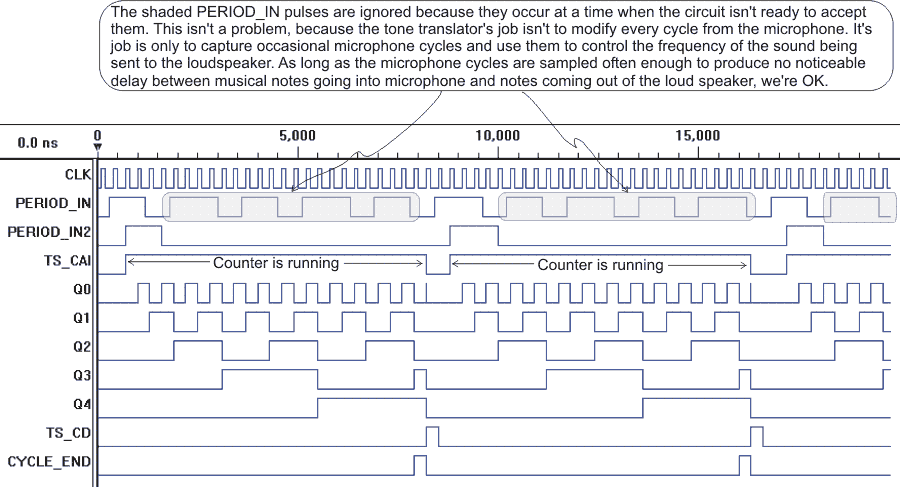
Your job is to add circuitry to the Timing Signal circuit of gi26-13, so that the waveforms will look like those shown below. You'll probably need to add two D flip-flops, an RS flip-flop, and some gates.

Right-click here to download the test vector file. (Choose Save, not Open.)

 
Tips
  • We're going to be re-using the projects you do as we combine them as modules. So, hang on to all your files, and keep them orderly.
  • Bring your flash drive or floppy with you when you come to class.
  • Keep your files on your flash drive or floppy.
  • Frequently use Windows Explorer to copy the files from your flash drive or floppy to the hard drive of a computer. 
    • Flash drives can go bad. (I've had it happen to me.)
    • Floppies go bad quite often. Our strong winds and the dust they kick up are hard on floppies.
  • When you start a new project:
    • Make a new folder for it.
    • (Lever makes enough files as it is, without having files from two or more projects all jumbled up in one folder.)
  • When you modify a project:
    1. Get into Windows Explorer by right-clicking the green Windows Start button and then clicking Explore in the menu that comes up.
    2. Make a new folder (with a different name).
    3. Copy the schematic file(s) from the old folder into the new folder.
    4. Copy the test vector file from the old folder into the new folder.
    5. Rename the schematic file(s) and the test vector file so that they have new names reflecting the changes you are making.
    6. Don't copy any other files from the old folder.
    7. Start a new project in Lever, and select the new folder you just made.
 
Signal Name
Description
TS_CAI Timing signal counter cascade in (enable)
TS_CD Timing signal counter, clear D flip-flops
CYCLE_END The timing signal cycle has finished, and a new one can start.
PERIOD_IN2 The PERIOD_IN pulses that will be processed by the rest of the tone translator circuitry. (Pulses that occurred when the tone translator wasn't ready for them have been discarded.)


Hints
  • The only inputs to the timing signal circuitry are CLK and PERIOD_IN. All the others are outputs.
  • Use two D flip-flops and a 3-input AND gate to create a signal that will go into the S input of the RS flip-flop in the gi26-13 timing signal experiment. (This is where PERIOD_IN used to go.)
    • You'll need inverting circles on some of the AND gate's inputs.
    • Connect PERIOD_IN to the first of the two D flip-flops you added above.
    • Connect the second D flip-flop to the output of the first D flip-flop to create a shift register.
    • The AND gate's output should go high only when the first D flip-flip is high and the second one is low. Also, for the AND gate's output to go high, TS_CAI should be high low.
      • Thus, the gate's output will go high when TS_CAI is high and PERIOD_IN first goes high.
  • Use an RS flip-flop to create the PERIOD_IN2 signal (output).
    • Set the flip-flop when PERIOD_IN has first gone high and TS_CAI is high low.  
    • Reset (clear) the flip-flop when the first of the two D flip-flops you added above goes low.


Back to Main Page
1