gj12-09 Square wave Generator
For Tone Translator
15 points
OEES 235
|
 |
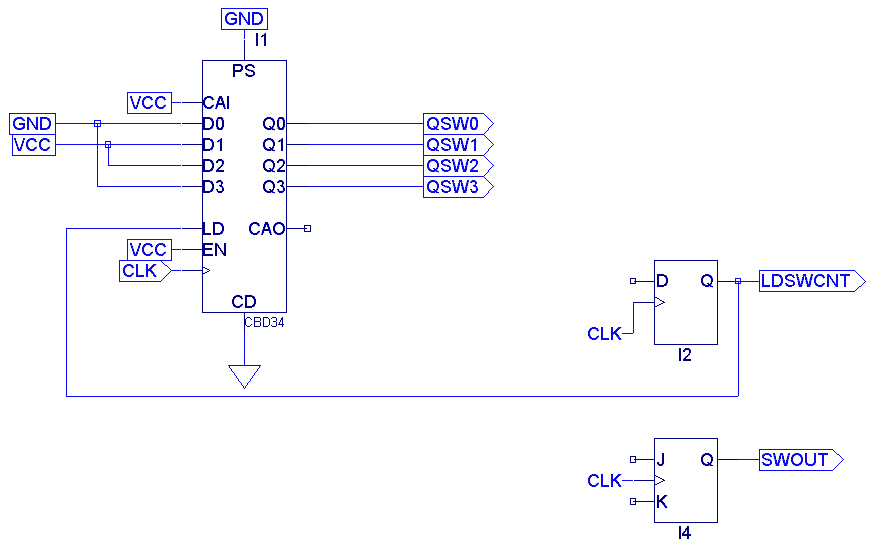
The purpose of this
circuit is to take the number from the output counter, and then keep
producing square waves with periods based on that number until a new
number is available from the output counter. This is necessary because
the input counter may not be able to catch every cycle coming from the
microphone. Also, we will eventually have circuitry that takes the
average of several output counter cycles, and then sends this average
on to the square wave generator. Thus, the square wave generator will
produce steady tones based on the waveforms from the microphone and the
octave shifts requested by the musician.
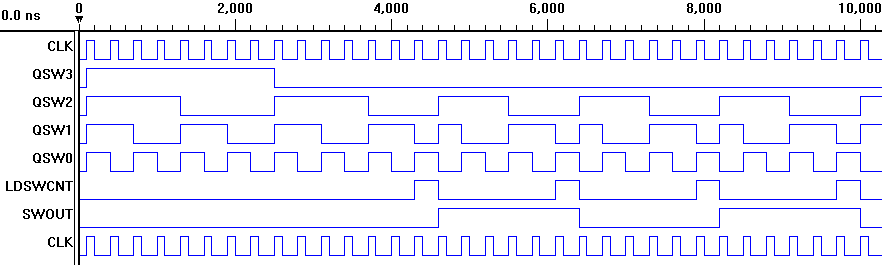
The down-counter in the above circuit will eventually receive it's parallel input data (D0 through D3) from the output counter (which we haven't implemented yet). This binary number determines the period of the square wave to be produced by the tone translator. This square wave will be amplified and sent to a loudspeaker. Later, we may add-on circuitry to create additional waveforms to mimic different musical instrument sounds. (Luckily, the square wave itself produces a pleasing sound similar to that of a clarinet.) Once the down-counter in the schematic above has been loaded with the number representing the desired period for the SWOUT square wave, the counter should count down until it reaches the number two. It seems like we should have the counter count down to zero instead of two, but because of various timing delays, we would then end up with a square wave that's two clock pulses too long. By having the counter stop at two, SWOUT will have the correct period. Incidentally, the squarewave produced will have a period twice as long as desired. This is due to the fact that the positive half of the square wave will have a duration equal to the time required for the down-counter to reach two. The negative half of the square wave will have the same duration. Thus, the period of the square wave will be twice that of the time required for the counter to reach two--in other words, twice the desired period. Luckily, this will easily be corrected for once we design the octave control circuit. We'll simply have this circuit shift the frequency one octave higher than it would otherwise be. Legend
Right-click here to get the test vector file. When you save the file, be sure the file type is set to all files. Directions and Hints
|

